
YouTube API Integration Example: A Production-Ready Guide
See a complete API integration example for the YouTube Download API. This code-first guide covers async jobs, error handling, and scaling patterns.
Dalvo · July 16, 2026
You probably started with a simple script. Paste in a YouTube URL, call a library, save the file, done. For a few test videos, that feels like a solid API integration example.
Then production traffic hits. A user submits a long video. Another submits an age-restricted one. A batch job pushes many URLs at once. Suddenly the integration that looked clean in development becomes a queue of 403 and 429 errors, unclear failures, and support tickets asking why one video worked yesterday but not today.
That gap between demo code and production behavior is where most media integrations break. The reliable pattern isn't a single synchronous request that blocks until a file is ready. It's an asynchronous job flow that accepts work quickly, returns a job ID plus metadata, and lets your application poll for completion while staying responsive.
Table of Contents
- Beyond Hello World API Integrations
- Initial Setup and Authentication
- The Core Asynchronous Workflow Code Examples
- Advanced Features Trimming and Audio Tracks
- Handling Errors Deterministically
- Scaling and Production Best Practices
Beyond Hello World API Integrations
A user drops a video URL into your app and expects a file back in seconds. During local testing, that flow looks simple enough. In production, the request can trigger URL validation, metadata lookup, availability checks, format selection, media preparation, and delivery packaging. That is not a single request-response exchange. It is a job.
Many API tutorials still center on synchronous examples because they are easy to explain and easy to demo. For media workflows, they also teach the wrong shape of integration. A single POST followed by an immediate file response hides the parts that usually fail first under load: long-running work, variable processing time, retry behavior, and state transitions your application has to track.
The common failure pattern is easy to spot:
- A script works locally: one engineer tests a few public URLs and gets the expected file.
- Production inputs get messier: users submit longer videos, restricted content, bad links, or duplicate requests.
- Operations get noisy: 403s and 429s show up, retries pile on, and support starts asking whether the job is stuck or just slow.
Practical rule: If media preparation takes meaningful time, model it as an asynchronous job from day one.
That design gives you cleaner failure boundaries. The client submits the URL and output options. The API returns quickly with a job ID. Workers handle the expensive steps off the request path, and the client checks status until the result is ready. The async model provides a clear advantage here. It keeps user-facing requests fast, prevents timeout-driven guesswork, and gives your system a visible state machine instead of a hanging connection.
It also changes the maintenance burden. A DIY pipeline often leaves your team owning extractor breakage, anti-bot workarounds, proxy rotation, and edge cases around unavailable media. A managed service with a stable job-based contract, such as this YouTube download API for asynchronous media processing, pushes those concerns behind the API boundary. The value is not just cleaner application code. It is fewer moving parts for your team to babysit at 2 a.m.
Three capabilities matter in practice:
- Fast acknowledgement so the client gets an immediate response instead of waiting on media work.
- Observable job state so pending, running, completed, and failed are explicit and queryable.
- Deterministic failure handling so each error maps to a specific action, such as retry, user correction, or terminal failure.
Teams usually get into trouble when they optimize for the demo path instead of the operating model. The question is not how to download a file with one API call. The question is how to build a media integration that stays predictable when processing takes time, inputs vary, and some jobs fail for reasons your application needs to understand.
Initial Setup and Authentication
Before touching job logic, lock down authentication. Most integration pain starts earlier than people admit. The mistake isn't usually a bad endpoint. It's hardcoding credentials, mixing environments, or sending the wrong authorization header and then debugging the wrong layer.
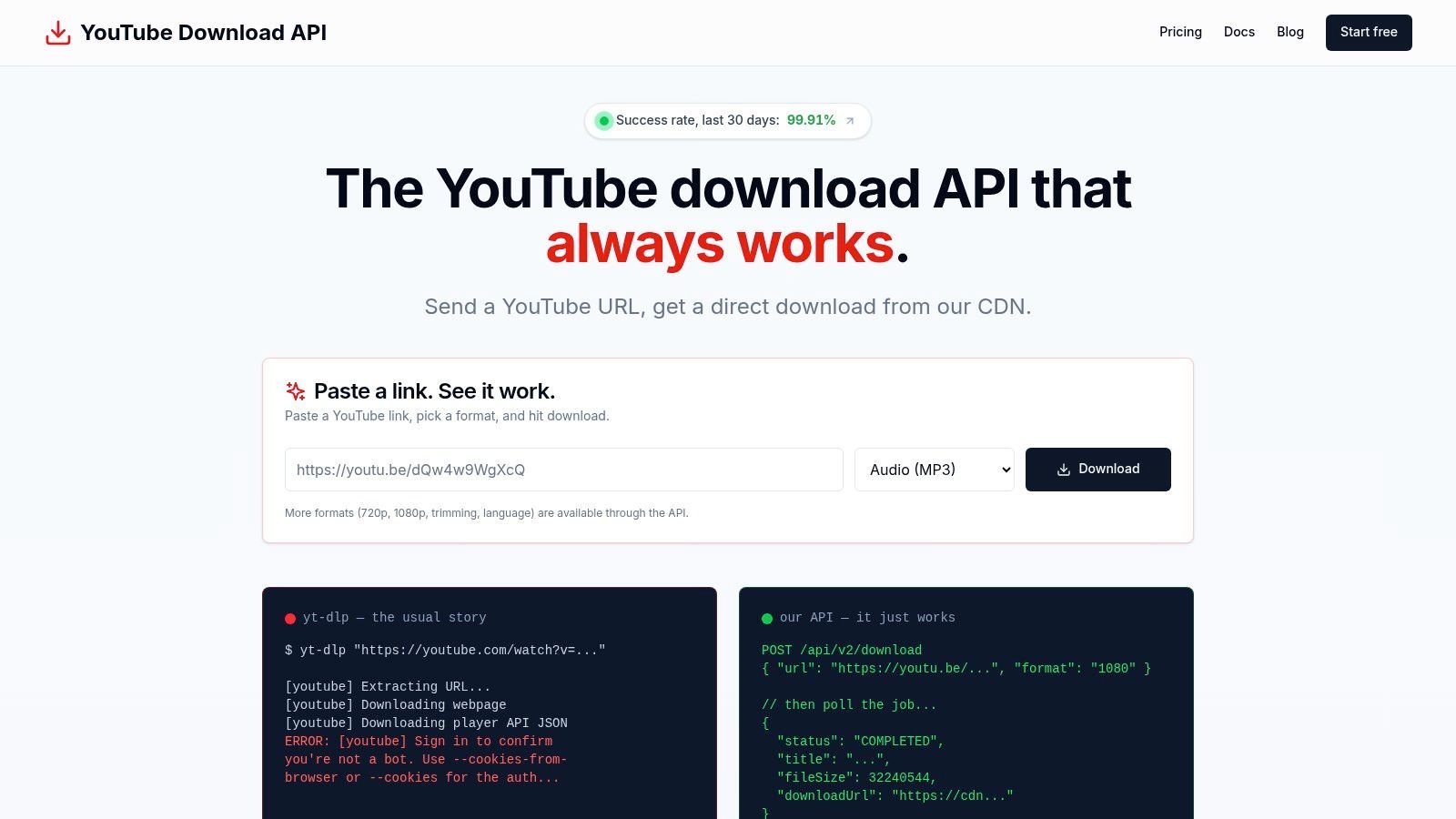
Store the API key in an environment variable. Don't commit it to a repository. Don't tuck it into frontend code. Don't paste it into a shared script that gets copied between teammates. For a server-side integration, the key belongs in your secret store or deployment environment, then gets injected into the process at runtime.
Use one auth convention everywhere
Keep the request shape boring and consistent:
- Header format:
Authorization: Bearer <YOUR_API_KEY> - Transport: HTTPS only
- Ownership: server-side services, background workers, and trusted internal tools
That consistency matters. When every request goes through the same auth helper, you eliminate a whole class of small mistakes. Teams often lose hours because one worker uses a bearer token, another uses a custom header, and a quick test script uses an old key from a local shell session.
A simple status check is the fastest way to confirm your setup before you write polling code or queue workers. The API docs should be the source of truth for the exact endpoint shape, but the pattern looks like this:
Verify the key before writing real logic
curl -X GET "https://api.example.com/status" \
  -H "Authorization: Bearer $YTDLP_API_KEY" \
  -H "Accept: application/json"
A request like that proves four things at once:
- Your key is active
- Your header is formatted correctly
- Your environment variable is wired into the process
- Your app can reach the service
Treat authentication as a deployment concern, not an application detail. Once that's stable, the rest of the integration gets much easier to reason about.
A quick walkthrough helps if you're wiring this into a dashboard-managed key flow:
Two setup habits worth keeping
- Separate keys by environment: development, staging, and production shouldn't share the same credential.
- Wrap outbound calls in one client module: one place for base URL, headers, timeout defaults, and response parsing.
This sounds mundane, but it's what makes a production integration maintainable. If every engineer writes their own one-off request logic, the auth layer drifts fast.
The Core Asynchronous Workflow Code Examples
The durable API integration example for media processing has three steps. Submit work. Poll for state. Retrieve the finished result.
The reason this pattern works is architectural, not stylistic. A production-grade API integration following an asynchronous job pattern reduces time-to-first-byte latency by 40 to 60% compared to synchronous streaming downloads and enables early UI population before file preparation finishes, as noted in GetPhyllo's discussion of YouTube API integration patterns.
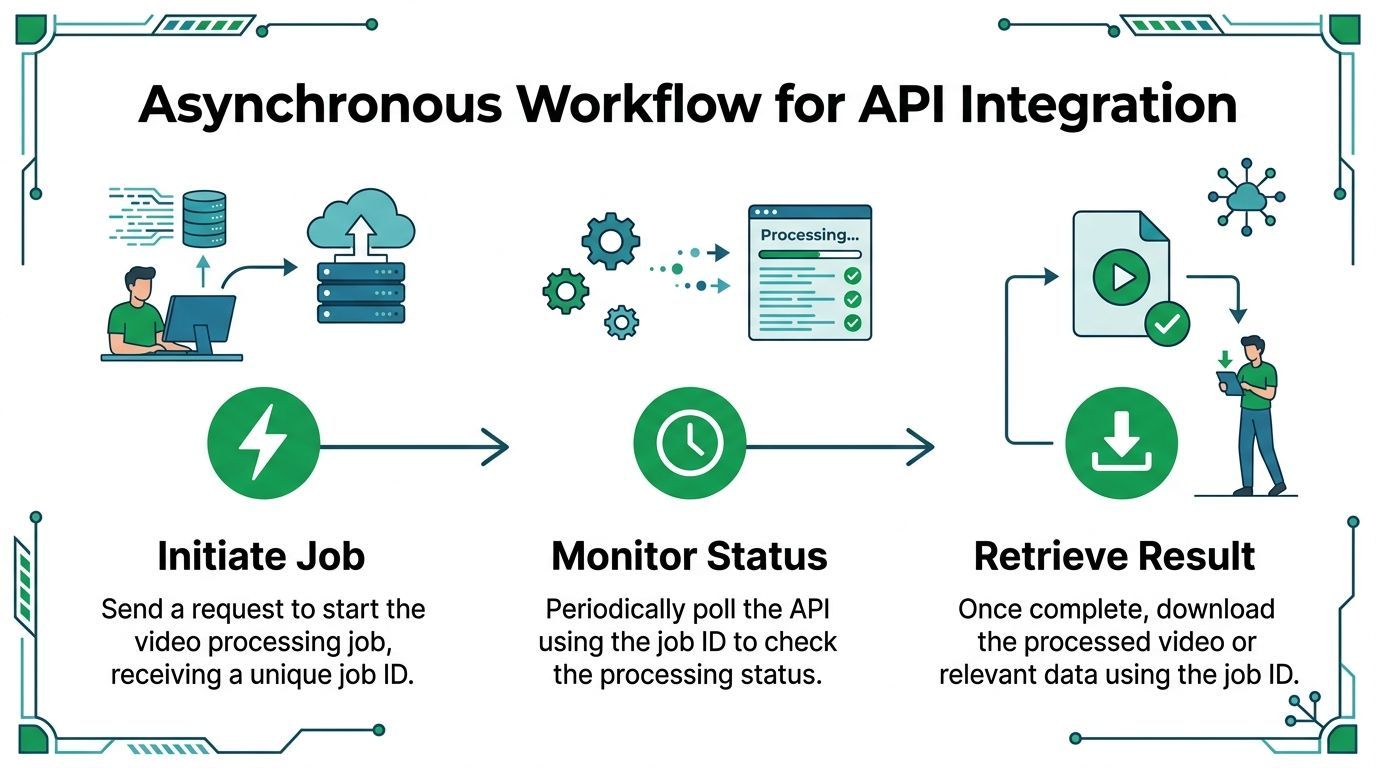
Submit the job
The first request should be fast. Its job isn't to return a video file. Its job is to validate input, enqueue work, and return a stable identifier.
cURL
curl -X POST "https://api.example.com/jobs" \
  -H "Authorization: Bearer $API_KEY" \
  -H "Content-Type: application/json" \
  -H "Accept: application/json" \
  -d '{
    "url": "https://www.youtube.com/watch?v=VIDEO_ID",
    "format": "mp4",
    "quality": "1080p"
  }'
Node.js
const response = await fetch("https://api.example.com/jobs", {
  method: "POST",
  headers: {
    "Authorization": `Bearer ${process.env.API_KEY}`,
    "Content-Type": "application/json",
    "Accept": "application/json"
  },
  body: JSON.stringify({
    url: "https://www.youtube.com/watch?v=VIDEO_ID",
    format: "mp4",
    quality: "1080p"
  })
});

const job = await response.json();
console.log(job.jobId, job.title, job.duration);
Python
import os
import requests

response = requests.post(
    "https://api.example.com/jobs",
    headers={
        "Authorization": f"Bearer {os.environ['API_KEY']}",
        "Content-Type": "application/json",
        "Accept": "application/json",
    },
    json={
        "url": "https://www.youtube.com/watch?v=VIDEO_ID",
        "format": "mp4",
        "quality": "1080p",
    },
    timeout=30,
)

job = response.json()
print(job["jobId"], job.get("title"), job.get("duration"))
What you want back immediately is a job ID and any metadata the API can provide early, such as title, duration, or file hints. That lets the UI show meaningful state instead of a spinner with no context.
Poll for status
Polling is where many integrations go sloppy. Don't poll aggressively. Don't spawn unbounded loops. Don't make the frontend own all of it unless your app is tiny and internal.
A simple pattern works well:
- Submit the job.
- Save
jobId. - Poll
/jobs/{id}on an interval. - Stop on
COMPLETEDorFAILED.
cURL
curl -X GET "https://api.example.com/jobs/JOB_ID" \
  -H "Authorization: Bearer $API_KEY" \
  -H "Accept: application/json"
Node.js
const sleep = (ms) => new Promise(resolve => setTimeout(resolve, ms));

async function pollJob(jobId) {
  while (true) {
    const response = await fetch(`https://api.example.com/jobs/${jobId}`, {
      headers: {
        "Authorization": `Bearer ${process.env.API_KEY}`,
        "Accept": "application/json"
      }
    });

    const data = await response.json();

    if (data.status === "COMPLETED" || data.status === "FAILED") {
      return data;
    }

    await sleep(2000);
  }
}
Python
import os
import time
import requests

def poll_job(job_id):
    while True:
        response = requests.get(
            f"https://api.example.com/jobs/{job_id}",
            headers={
                "Authorization": f"Bearer {os.environ['API_KEY']}",
                "Accept": "application/json",
            },
            timeout=30,
        )

        data = response.json()

        if data["status"] in ("COMPLETED", "FAILED"):
            return data

        time.sleep(2)
Polling isn't glamorous, but it gives you explicit state. That explicit state is what keeps support conversations short.
For production systems, move this loop behind a service or worker when possible. Frontend polling is fine for small apps, but server-side orchestration gives you better control over retries, logs, and background completion handling.
Retrieve the result
Once the job is complete, parse the final response and extract the direct download URLs and final metadata.
cURL
curl -X GET "https://api.example.com/jobs/JOB_ID" \
  -H "Authorization: Bearer $API_KEY" \
  -H "Accept: application/json"
Node.js
const result = await pollJob(job.jobId);

if (result.status === "COMPLETED") {
  console.log("Video URL:", result.video?.url);
  console.log("Audio URL:", result.audio?.url);
  console.log("File size:", result.fileSize);
} else {
  console.error("Job failed:", result.error);
}
Python
result = poll_job(job["jobId"])

if result["status"] == "COMPLETED":
    print("Video URL:", result.get("video", {}).get("url"))
    print("Audio URL:", result.get("audio", {}).get("url"))
    print("File size:", result.get("fileSize"))
else:
    print("Job failed:", result.get("error"))
A few practical choices make this cleaner:
- Persist the job ID early: it becomes your trace key across logs, UI, and support.
- Render metadata before completion: users tolerate waiting better when they can see the title and requested output.
- Treat the download URL as output, not state: don't assume it exists until the job is complete.
This is the point where the async model pays off. Your request path stays responsive, your state transitions are visible, and your code reflects how media processing behaves.
Advanced Features Trimming and Audio Tracks
Full-file downloads are only one use case. In practice, teams usually need a smaller, more purposeful output. A social clip, a segment for transcription review, or a localized audio variant.

Clipping for downstream workflows
A useful media pipeline often starts with a precise segment, not the entire source file. If you're building a repurposing tool, you might want one highlight from a long interview. If you're building a training workflow, you might only need the section where a speaker demonstrates a task.
That changes the submission payload. Instead of sending only the source URL and format, send trim boundaries too.
{
  "url": "https://www.youtube.com/watch?v=VIDEO_ID",
  "format": "mp4",
  "quality": "720p",
  "startTime": 30,
  "endTime": 75
}
The integration benefit is bigger than convenience:
- Less post-processing: your app doesn't need to trim after download.
- Cleaner storage behavior: you keep the artifact you need.
- Better workflow fit: downstream systems get a clip, not a raw source file they still need to cut.
A solid overview of media-oriented workflow thinking appears in this blog post on YouTube video processing and automation, especially if you're building ingestion or repurposing tools rather than a one-off downloader.
Build the smallest useful artifact. If the product needs a clip, request a clip.
Choosing an audio track without breaking the job
Multi-language audio gets overlooked until users ask why the output doesn't match the version they watched. Dubbed content makes this common. One viewer wants Spanish audio. Another wants the original track. Your integration has to express that preference without becoming fragile.
A typical request adds a language field:
{
  "url": "https://www.youtube.com/watch?v=VIDEO_ID",
  "format": "mp3",
  "lang": "es"
}
The practical issue isn't how to ask for a language. It's what happens when that language isn't available. Good integrations don't fail noisily for that. They apply a sensible fallback and tell your application what happened so you can present the right message.
Here are the habits that keep this feature manageable:
- Store the requested language separately from the resolved language: users and support staff need to know both.
- Expose fallback behavior in the UI: if the platform delivered the default track, say so.
- Keep trimming and audio selection independent: one missing audio track shouldn't force you to redesign clip creation logic.
Many "simple" API integration examples often fall short. Real media workflows aren't just fetch-and-save operations. They are decisions about format, language, and which slice of the source matters.
Handling Errors Deterministically
When a media job fails, 500 or FAILED isn't enough. The application needs to know whether the content is age-restricted, members-only, unavailable in the user's region, or private. Those are different product outcomes, not just different technical details.
Most API integration example guides fail to address how to programmatically map specific, domain-aware error codes like AGE_RESTRICTED or MEMBERS_ONLY to user-friendly messages, and that gap leads to poor UX and manual troubleshooting, as discussed in this analysis of hidden API integration complexity.
Why generic errors are expensive
A generic error pushes decision-making onto humans. Support reads logs. Engineers inspect payloads. Product managers ask whether the user should retry. Nobody has enough context because the integration didn't classify the failure cleanly.
A machine-readable error taxonomy fixes that. When the job returns FAILED, the response should include an error object with a stable code and a readable message. Your app can then decide what to do without guessing.
{
  "status": "FAILED",
  "error": {
    "code": "GEO_RESTRICTED",
    "message": "This video is not available in the requested region."
  }
}
That lets the backend make one choice and the UI make another. The backend can stop retrying because the failure is deterministic. The UI can tell the user what happened in plain language.
API Error Code Taxonomy
| Error Code | Meaning | Recommended Action |
|---|---|---|
AGE_RESTRICTED | The source requires age verification or restricted access. | Show a message that the content can't be processed through the current workflow. Don't auto-retry. |
MEMBERS_ONLY | The video is limited to channel members. | Disable download actions for this item and tell the user the content requires membership access. |
GEO_RESTRICTED | The content isn't available in the relevant region. | Present a region-specific message and stop retries unless your product has a valid alternate path. |
DRM_PROTECTED | The media is protected and can't be handled as a normal downloadable asset. | Mark the item as unsupported and route it out of the standard ingestion flow. |
PRIVATE_VIDEO | The source is private and unavailable to the current retrieval method. | Tell the user the video isn't publicly accessible and ask for a different source. |
VIDEO_UNAVAILABLE | The URL points to content that can't be retrieved. | Prompt the user to verify the link or submit a replacement. |
Users don't need raw platform jargon. They need a clear next step.
A few implementation rules help:
- Map error codes once: build a shared lookup in your backend or frontend, not scattered
ifstatements across the app. - Log both HTTP status and domain error code: they answer different questions.
- Stop retrying deterministic failures:
GEO_RESTRICTEDwon't improve because you waited a few seconds.
This is one of the biggest differences between a toy integration and a production one. A toy pipeline only has a happy path. A production pipeline turns expected failure modes into named states with known handling.
Scaling and Production Best Practices
The integration isn't production-ready when the happy path works. It's production-ready when traffic spikes, jobs hang longer than usual, and operators can still tell what happened.
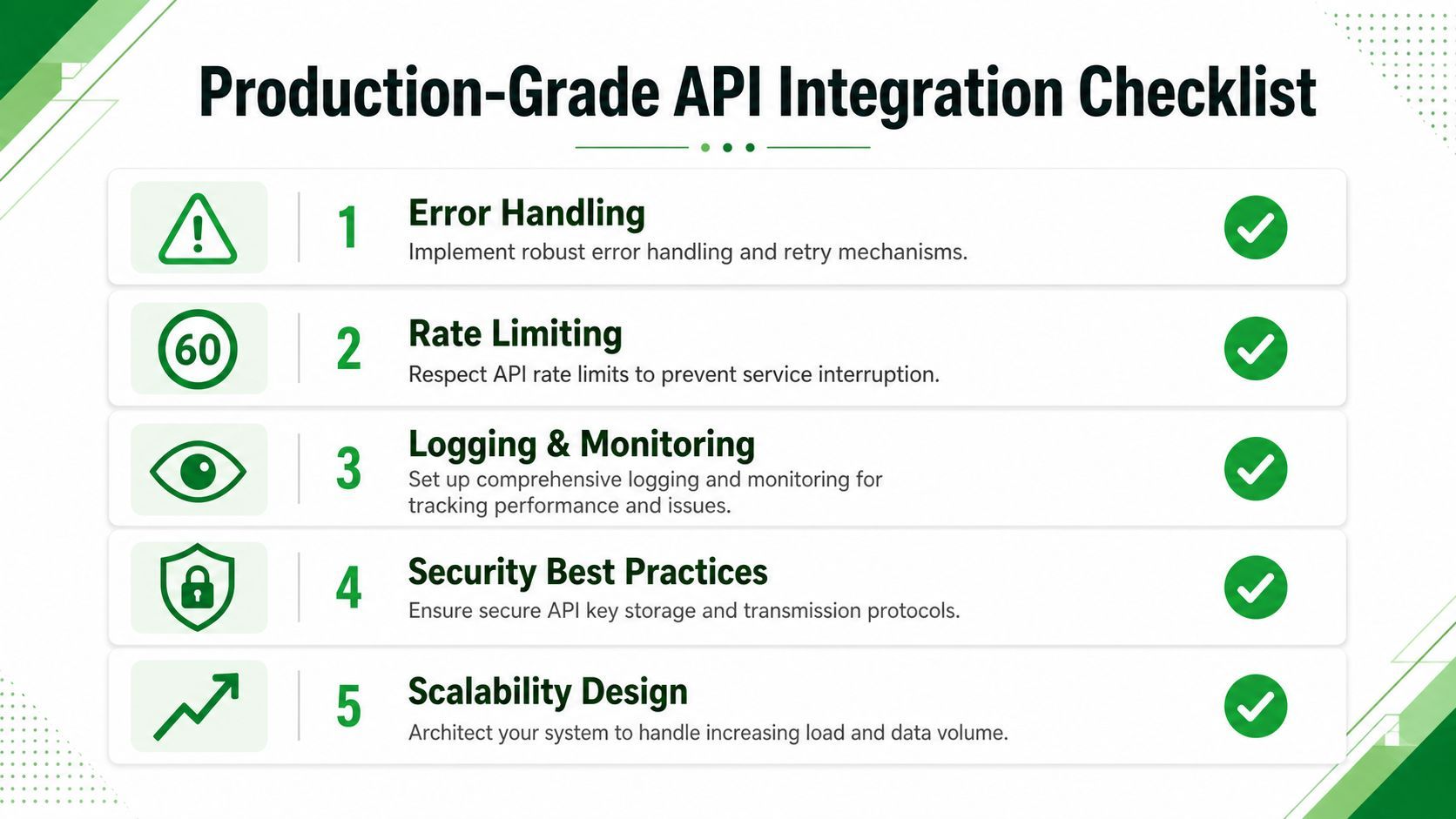
Retries that help instead of hurt
Retry logic needs restraint. If every worker polls too frequently or retries every transient issue immediately, your own client becomes part of the problem.
Use exponential backoff for transient network failures and temporary server-side issues. Keep deterministic media failures out of that retry loop. A failed request because of a timeout may deserve another attempt. A failed job because the video is members-only does not.
The difference matters operationally:
- Transient failures: retry with spacing
- Deterministic content failures: classify and stop
- Long-running jobs: keep polling intervals reasonable
Operational habits that keep the integration boring
Boring is the goal. A stable integration should produce predictable logs, traceable job lifecycles, and visible usage patterns.
Keep these habits in place:
- Log the
jobIdeverywhere: submission, polling, completion, and failure records should all include it. - Record status transitions:
PENDING,PROCESSING,COMPLETED, andFAILEDbecome much easier to debug when you can see the sequence. - Watch credit usage: by 2024, credit-based metering became the dominant pricing model for video download APIs, with custom volume rates negotiated for high-throughput clients handling over 100,000 monthly jobs, which makes usage monitoring an operational necessity according to this discussion of video download API pricing patterns.
A few practical checks belong in every deployment review:
- Secrets discipline. Keys live in environment-specific secret storage, not code.
- Observability. You can answer "what happened to job X?" without opening five systems.
- Backoff policy. Polling and retries are bounded and intentional.
- Cost awareness. Someone owns credit monitoring before finance asks questions.
- State cleanup. Old job records and stale client state don't accumulate forever.
If an integration depends on luck, it will eventually fail at the worst time.
These aren't extras. They're the work that turns an API integration example into a service users can rely on.
If you're building YouTube import, transcription, clipping, or media analysis workflows, YouTube Download API is worth evaluating. It gives engineering teams a production-ready async job flow, direct CDN download URLs, trimming, audio-track selection, and machine-readable error handling without pushing bot detection, proxies, or cookie management onto your application.